DATA PROTECTION · MYSASHA
Your work.
Your private life.
A plain explanation of our protections, including their limits.
Document journey ↓Who sees data ↓
Documents and the database are encrypted at rest.
The console shows your phone number, name, account ID, iOS build and last server contact. Cloud AI temporarily processes selected content.
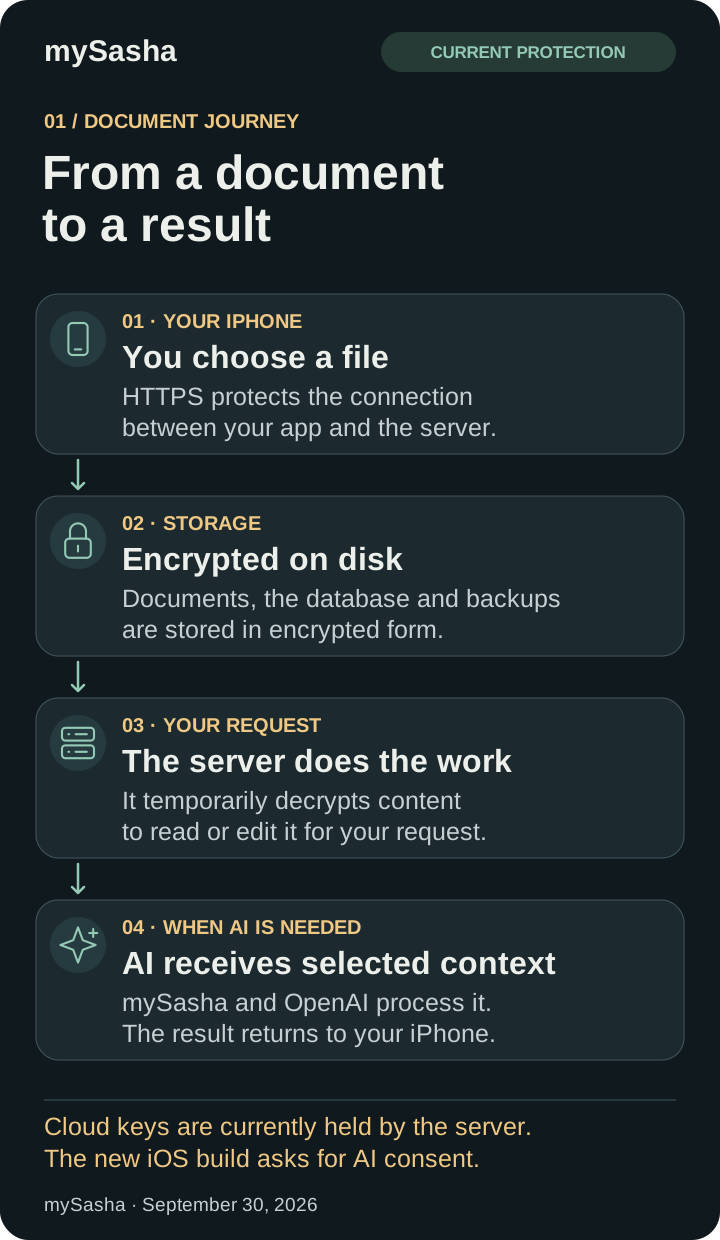
What happens to a document
Save image · PNG SVG
More about each step
- You upload a file.
HTTPS protects the connection between the app and the server.
- It is stored encrypted.
Documents, versions, signatures, receipt images and previews are encrypted on disk. Opening the stored file directly does not reveal its contents.
- The app uses it for your request.
The server temporarily decrypts content to read or edit it, or to send selected materials to AI. Tools requiring a file receive a restricted temporary copy, removed after processing.
Notification previews
Mail, tasks, meetings and AI replies have separate notifications. With previews enabled, a short excerpt is shown and passes through Apple’s push service. Turn previews off in mySasha settings to show only the notification type. Your iPhone settings also control previews on the lock screen.
What our team can see
The console cannot access your mail, chats, documents or recordings. Account management shows your phone number, name and ID. The iOS section also shows the build and last server contact. The iOS section shows estimated AI costs per account for today, the month and all time, without request text. Support separately sees only descriptions and screenshots you choose to send in a report. Once billing is connected, confirmed account payments will appear here.
This is a console restriction. The current server holds keys and decrypts content for app functionality. We do not describe cloud processing as end-to-end encryption or claim that infrastructure administrators are technically unable to access all content.

Save image · PNG SVG
How AI uses data
Selected messages, emails, documents, images and audio are processed by mySasha’s server and OpenAI to answer or perform your request. The new iOS version asks for consent before your first AI submission. You can revoke it in Profile → Data protection.
Your request text stays out of our usage statistics. We turn off response history storage for text AI requests. OpenAI still processes selected materials and may keep them under its own rules. A separate arrangement to remove that retention is not yet agreed.
OpenAI’s data controls →Protection on your iPhone
Copies saved on your iPhone are encrypted with a device key in the iPhone’s protected storage. The key does not migrate in device backups and is not held on our server.
You can enable Face ID or iPhone passcode access. Signing out clears saved copies.
Support: what you choose to share
In the new iOS version, you can describe a problem and choose up to three screenshots. You can review what the support team will receive before sending. Text and images are encrypted at rest, kept for up to 90 days and accessible only as part of your support report. Chats, mail and documents are never attached automatically. Diagnostics are off by default in the new iOS version; if enabled, only crash codes and versions are transmitted, without content, files or stack traces.
Backups and the next protection level
Backup archives use a separate encryption key. Independent backup storage and isolated confidential processing are planned next steps, not active guarantees.
A personal recovery key was selected for a future mode with user-held keys. That mode is not yet enabled for all cloud content; SMS sign-in does not provide that architecture.
No impossible promises
No service can guarantee protection against every attack. Encryption works alongside access controls, checks and updates. Your iPhone passcode and care with unfamiliar links remain important.
Protection changes described as of October 3, 2026. iPhone settings refer to the new iOS build; TestFlight availability is verified separately.